Client work
Client approval email templates for every stage
Six copy-ready client approval email templates: the first ask, a new version, a reminder, an overdue chaser, confirming sign-off and approve with changes.
9 min read
Project management for agencies, studios and client teams
Boards, tasks, files and approvals in a workspace your clients can join for free. Fast on a laptop with the keyboard, and usable on a phone when you are reviewing work on the move.
Free plan · No credit card · Clients always free
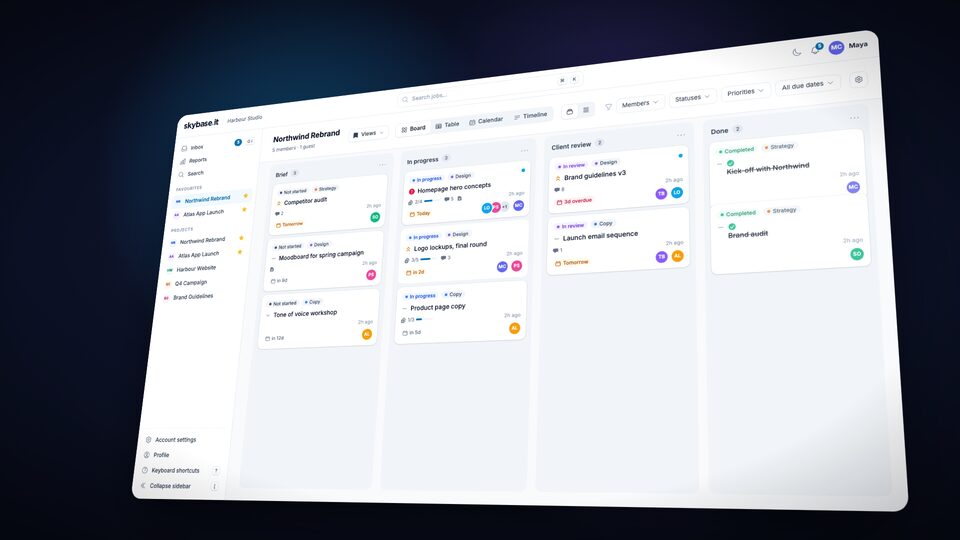
The Northwind Rebrand board with Brief, In progress, Client review and Done columns. Leo drags the Homepage hero concepts card into Client review, where it gets the In review label, the client Tom comments on it with an @mention for Maya, and a notification appears.
The tour
The board, table, calendar and timeline, client approvals and client teams, the inbox, automations, reports and the board on a phone, cut to music. It plays with sound, so it waits for you to press play.
A 66-second tour of Skybase, set to instrumental music and sound effects with no narration. The skybase.it logo, then the words “Boards. Tasks. Files. Approvals.” and “Client work, finally in one place.” The Northwind Rebrand board builds itself, and “Logo lockups, final round” is dragged to Done and turns Completed. The board turns into the table, grouped by priority and filtered to Maya’s one critical job, and the filters are saved as a view called “My critical jobs”. On the October calendar, “Social launch kit” is dragged from the Unscheduled tray onto Friday 16 October: “Drag to reschedule.” On Northwind’s timeline, “Moodboard for spring campaign” is dragged three working days later. Ghost bars show where the jobs that wait on it would land, and when it is dropped “Tone of voice workshop” and “Rebrand launch” move into them: “Preview before it moves.” A toast says “2 waiting jobs moved too”, with Undo. A link is drawn from “Competitor audit” to the moodboard, the critical path is outlined, and against the “Kick-off plan” baseline three jobs are late: “3 late vs baseline · project end +2d”. Its card comes apart into its labelled parts: status, job type, unread, priority, tasks, comments, due date and people. Leo Ortiz asks Tom Becker, the client, to approve “Homepage hero”, version 2, due Friday. On his phone, Tom opens the review from the email, pins a comment, “Logo a touch bigger?”, chooses Approve with changes and adds his note, and Leo’s card turns “Approved with changes”: “Clients sign off. Right from the email.” A join link lets people with @northwind.test addresses ask to join the project in the Northwind client team. Jess Moreau confirms their email and an administrator approves them: “Invitation sent to jess@northwind.test.” The Client teams page lists Atlas and Northwind: “Guests in a client team only see their own team and your staff.” “Bring the whole client. Clients join free.” The inbox is triaged with the J, K, E, S and X keys, ending on “Inbox zero.” “Triaged from the keyboard.” An automation called Review hand-off builds as a sentence: when the status changes to In review, then assign to Leo Ortiz, then notify Tom Becker. The job moves to In review, the rule reassigns it from Priya Shah to Leo Ortiz, and Tom gets a notification: “Automations do the hand-off.” From Examples, “Archive jobs in Done after 14 days” is picked and switched on. Its run shows as a Scheduled check, and the finished job “Brand audit” is archived by the rule: “The board tidies itself.” The reports dashboard counts up to 128 jobs completed, with throughput, lead time and the jobs at risk. Pressing ⌘K opens the command palette, and typing “hom” finds the job “Homepage hero concepts”: “⌘K to anywhere.” On a phone, Skybase opens in the browser one column at a time, and a card is moved to Done with “Move to another column”: “Works on your phone.” Quick shots follow: “Dark mode.”, “Real-time.”, “Client approvals.”, “Client teams.”, “Every feature, every plan.” It ends on skybase.it, “Client work, finally in one place.” and “Free for up to 5 users · Clients join free”.
How it works
No setup weekend and no consultant. A project, a guest, and a file someone has to sign off.
One board per client project. A new project starts with Backlog, Active, QA and Completed; rename them the way you already work.
Add them straight onto a job. They see that project only, comment where the work is, and it costs you nothing.
The invite dialog on a job: tom@northwind.co typed into Email addresses, a line saying someone new joins as a free guest who sees that project only, a preview marking Tom as new with an invitation to send and no change to the paid seats, and a Send invitation button.
Ask for sign-off with a due date. Each decision comes back with who, when and which version.
One workspace
Skybase covers the whole life of a piece of client work without a plugin marketplace: the card, the checklist, the file, the decision and the invoice-free client.
The Northwind Rebrand board with Brief, In progress and Client review columns. Priya drags “Logo lockups, final round” from In progress to Client review, where it gets the In review label, then the same jobs switch to the table view.
Drag jobs between columns and everyone sees it move. Custom columns per project, labels across all of them, and the same jobs as a board, a table or a calendar.
Every task has its own owner and due date, so “done” means done.
Named approvers, pinned comments and a clear decision, free for clients.
Threads, @mentions and reactions on the job. Edit a comment after you post it, and a half-written reply survives a reload.
See who's online, who's away, and what just changed.
October 2026
Thursday 15 October
Unscheduled 3
Every job with a due date on a month grid, and a tray for the ones without. Drag a job to another day to reschedule it; on a phone the month becomes a day agenda.
Review hand-off
When the label In review is added Then assign to Leo then notify Tom
Administrators write a rule as a sentence: when this happens, assign, move, add or remove a label, mark complete, set the priority, notify or archive. Every change it makes shows on the job with a bolt and the rule's name.
22:00 – 08:00 · Europe/London
Your morning roundup
Wed 14 Oct · 09:00
In-app and email switches for each band of activity. Batch the email hourly, daily or weekly, mute in-app alerts during your quiet hours, and start the day with a 09:00 roundup.
Suggested tasks
Ask Claude to suggest subtasks, pick the ones you want, assign, set dates.
Isolated database, signed file links
Each workspace runs on its own subdomain with a dedicated database.
Press ⌘K to jump to any job, project or action. g i, g p and g r go to Inbox, Projects and Reports; n starts a job; ? lists the lot.
Select the cards you mean, then move, assign, add or remove labels, mark complete, set the priority, or archive them in one go.
One column at a time with a switcher along the top, hold to drag a card, or use “Move to”. No app to install.
Jobs & tasks
Open a job and everything is there: a rich description, tasks with their own assignee and due date, attachments with image previews, comments, private notes and an activity trail. Need to split a big job? Ask Claude to suggest the subtasks.
The Logo lockups, final round job showing its labels (none yet, so Add label), priority, due date, members, the Details, Tasks, Files and Notes tabs, and a checklist of five tasks, three complete. A fourth task is ticked and the progress bar moves to four of five. Beside the tabs is the comments panel with a comment from the client, Tom.
Approvals
Name who approves and by when. Clients review from the email, pin comments on images and PDFs, and decide.
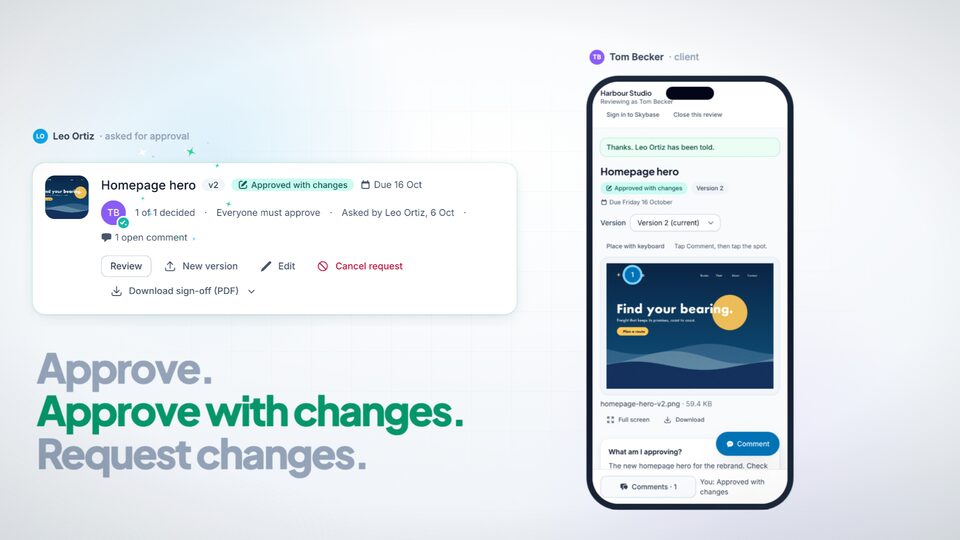
A 30-second film, set to instrumental music and sound effects with no narration. The skybase.it logo, with the words “Client approvals” under it. Leo Ortiz fills in Ask for approval for “Homepage hero”: Tom Becker as the approver, Everyone must approve, a due date and a short brief. He sends it, and his card on the job shows Awaiting approval: “Name who decides, and by when.” On his phone, Tom Becker, the client, gets the email that Leo added version 2 and opens the review from it without signing in: “Clients review from the email.” He taps Comment, then the logo, and pins a comment there, “Logo a touch bigger?”: “Comments exactly where they belong.” He chooses Approve with changes and adds his note. His phone says “Thanks. Leo Ortiz has been told.”, and Leo’s card turns “Approved with changes”: “Approve. Approve with changes. Request changes.” On the review page, Compare sets version 1 against version 2. The slider sweeps from version 1’s headline, “Find your way.”, to version 2’s, “Find your bearing.”, then the view switches to Side by side: “Version 2 asks again.” Leo’s card shows Approved with changes, 1 of 1 decided, Everyone must approve and who asked, and Download sign-off (PDF) offers a Team copy and a Client copy: “Every decision, on the record.” The round in four words: “Ask. Review. Decide. Sign off.” It ends on skybase.it, “Client work, finally in one place.” and “Free for up to 5 users · Clients join free”.
Automations
Write a rule as a sentence: when a job gets the In review label, assign it to Leo and let Tom know. Skybase runs it straight after the change is saved, or once a day for rules that wait on time, and the job's activity shows the change with the rule's name, so nobody wonders who did it.
An automation rule named Review hand-off, switched on: when the label In review is added, assign to Leo Ortiz, then notify Tom Becker. It has run 12 times. Beside it, Priya Shah adds the In review label to Brand guidelines v3, the rule reassigns it from Priya Shah to Leo Ortiz, a row marked with a violet bolt records that in the job's activity, and Tom Becker, the client, is notified.
Integrations
Built for
Agencies, in-house teams, freelancers and studios use the same boards, approvals and free guest access. Pick the page that sounds like you.
From the blog
Practical articles on planning projects, sharing work with clients and getting the sign-off.
Client work
Six copy-ready client approval email templates: the first ask, a new version, a reminder, an overdue chaser, confirming sign-off and approve with changes.
9 min read
Client work
Ten questions to ask any client approval software before you commit: sign-in, pinned comments, versions, reminders, records, phones and reviewer cost.
9 min read
Client work
Run several clients in one workspace without them seeing each other: client teams, join links that need your approval, and guests who stay free.
8 min read
Pricing
Every feature on every plan. Pro adds unlimited users, 100 GB of storage and priority support. Clients are free on both.
Pro Most popular
$3.99/user/month
Free plan, no credit card. Invite your client as a free guest.
Free plan · No credit card · Clients always free